-
Updates
-
Patients
-
Appointments
-
Examinations
-
Sales
-
Inventory
-
Promotions
-
Catalogs
-
Dashboards
-
Integrations
-
System
-
Resources
Brand Promotion
The Brand Promotion feature allows you to create promotions based on the purchase of products from a specific brand. When a patient purchases a qualifying product, Optopro automatically applies a discount to another eligible product based on the promotion rules you configure.
This promotion type is ideal for encouraging cross-selling, promoting premium brands, or running supplier-sponsored marketing campaigns.
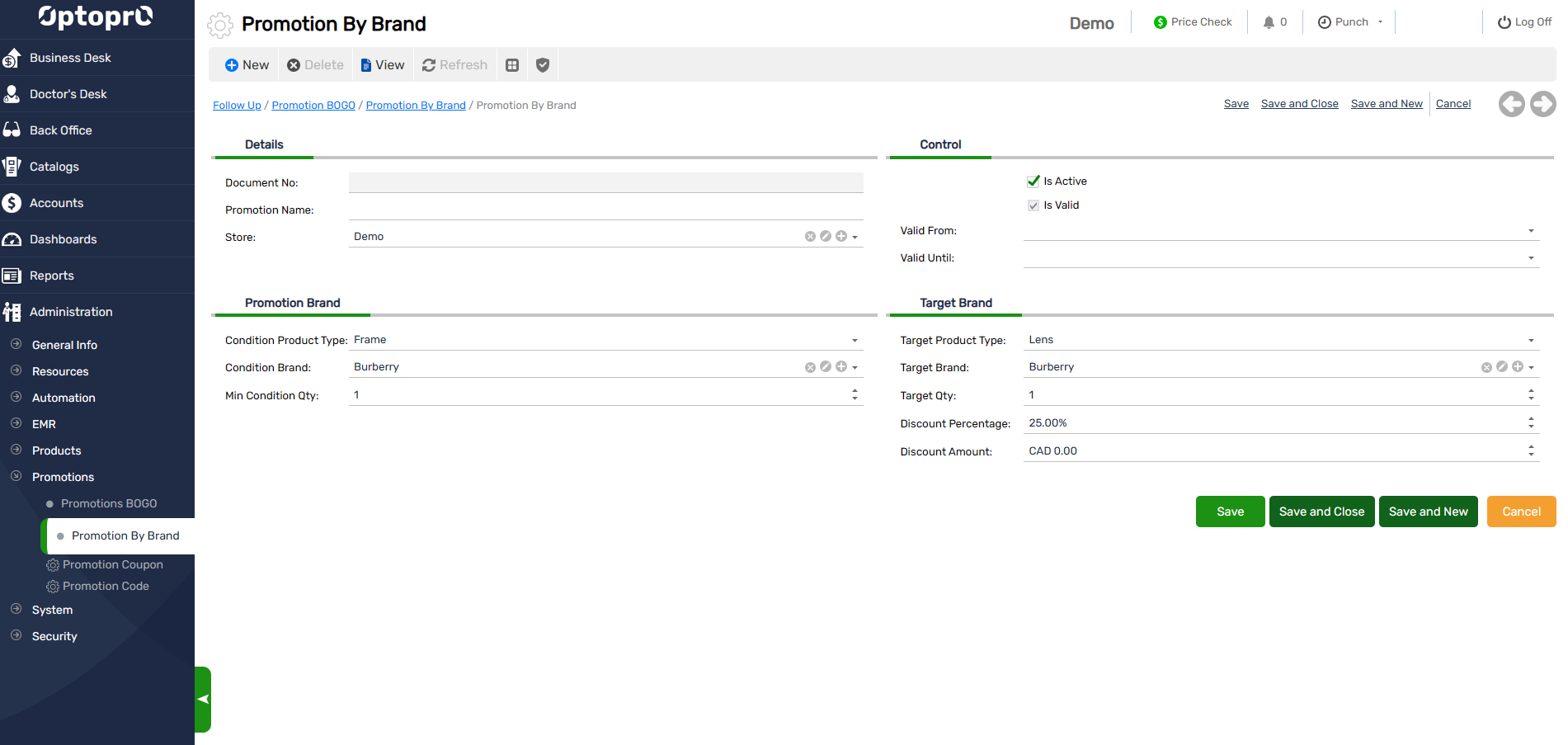
Configure Promotion Conditions
Condition Product Type
Select the product type that the patient must purchase to qualify for the promotion.
Available options include:
- Frame
- Lens
- Contact Lens
- Extra
- Item
- Service
Condition Brand
Select the brand that qualifies the patient for the promotion.
Example: Prada
Minimum Condition Quantity
Specify the minimum quantity of qualifying products the patient must purchase.
Example: 1
Configure the Target Product
Define the product that will receive the promotional discount.
Target Product Type
Select the type of product on which the promotion will be applied.
Available options include:
- Frame
- Lens
- Contact Lens
- Extra
- Item
- Service
Target Brand
Select the brand eligible for the promotional discount. This can be the same brand as the qualifying purchase or a different brand.
Target Quantity
Specify the number of eligible products that will receive the discount.
Example: 1
Discount Type
Choose how the discount should be applied to the target product.
Discount Percentage
Apply a percentage discount to the target product.
Example: 20%
Discount Amount
Apply a fixed dollar discount to the target product.
Example: $100
Example Promotions
Example 1 – Same Brand Promotion
| Setting | Value |
|---|---|
| Condition Product Type | Frame |
| Condition Brand | Prada |
| Minimum Condition Qty | 1 |
| Target Product Type | Frame |
| Target Brand | Prada |
| Target Quantity | 1 |
| Discount | 20%Off |
Result: When a customer purchases one Prada frame, they receive 20% off one additional Prada frame.
Example 2 – Cross Brand Promotion
| Setting | Value |
| Condition Product Type | Frame |
| Condition Brand | Prada |
| Minimum Condition Qty | 1 |
| Target Product Type | Lens |
| Target Brand | Essilor |
| Target Quantity | 1 |
| Discount | $100 Off |
Result: When a customer purchases one Prada frame, they receive $100 off one eligible Essilor lens.
How It Works
When an invoice is created, Optopro automatically:
- Verifies that the qualifying product type, brand, and minimum quantity requirements are met.
- Identifies the eligible target product.
- Applies the configured percentage or fixed amount discount.
- Calculates the final invoice amount automatically.
This ensures promotions are applied accurately and consistently without requiring manual calculations by staff.