-
Updates
-
Patients
-
Appointments
-
Examinations
-
Sales
-
Inventory
-
Promotions
-
Catalogs
-
Dashboards
-
Integrations
-
System
-
Resources
Creating a Promotion
Buy X Get X Promotion
Navigate to Administration >> Promotions >> Promotions BOGO and click New to add new promotion
Configure the following information:
Details
- Promotion Name
- Select the Store
- Promotion Type
- Promotion Status
Validity
- Valid From
- Valid Until
Applicable Products:
- Frames
- Lens
- Lens-Extras
- Contact lens
- Items
- Services
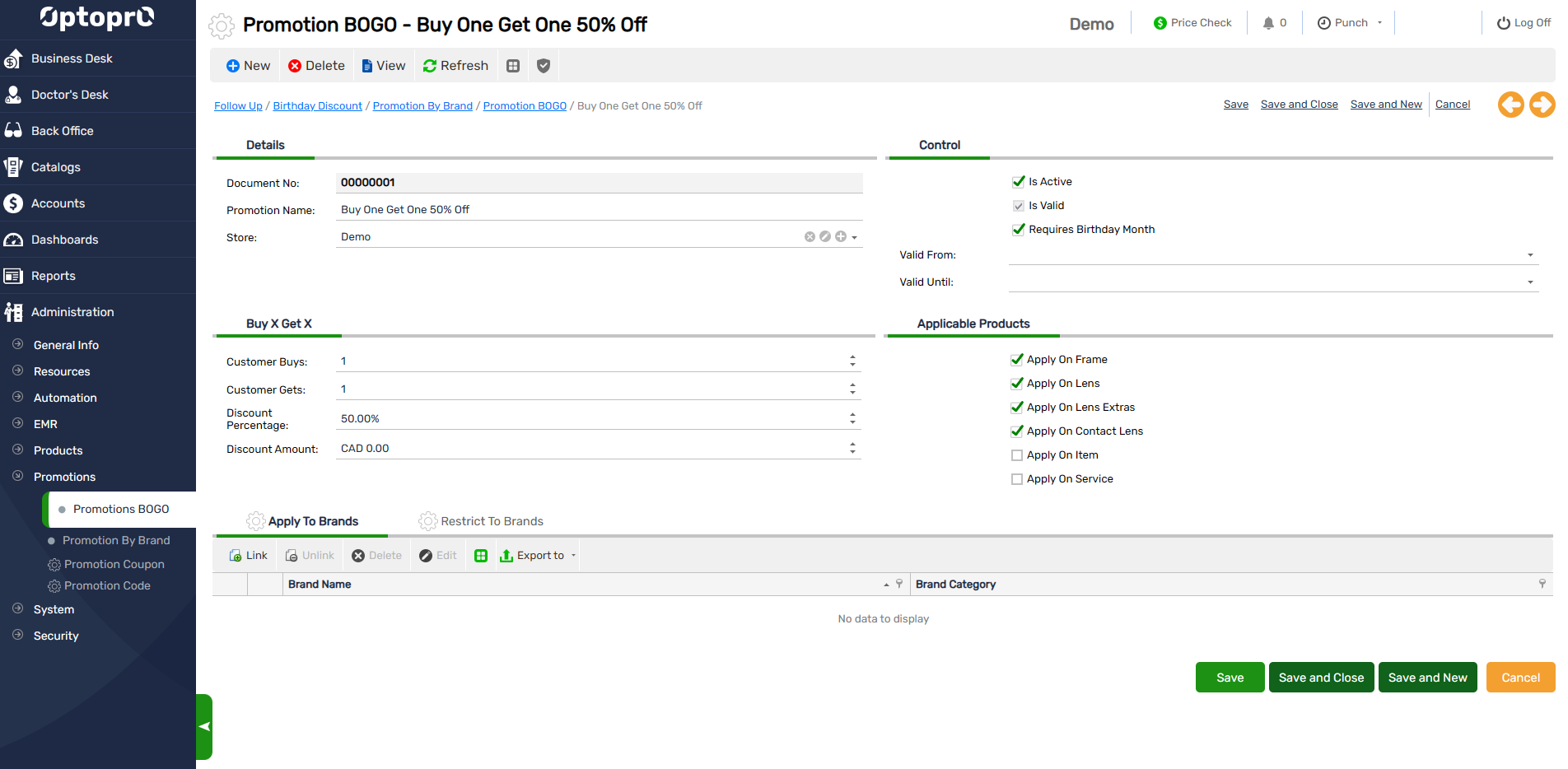
The Buy X Get X promotion allows you to reward patients with a discounted or free product when they purchase a specified quantity of eligible items. This promotion is ideal for offers such as Buy One Get One (BOGO), Buy 2 Get 1 Free, or Buy 3 Get 2 at 50% Off.
Configure Promotion Conditions
Define the purchase requirements that must be met before the promotion is applied.
Patient Buys
Specify the minimum quantity of eligible products the patient must purchase.
Example: 1
Patient Gets
Specify the quantity of products that will receive the promotional discount.
Example: 1
Discount Type
Choose how the promotional discount should be applied to the eligible product(s).
Discount Percentage
Apply a percentage discount to the promotional item.
Example: 50%
Promotion Example: Buy 1 Frame and get 1 additional Frame at 50% Off.
Discount Amount
Apply a fixed dollar discount to the promotional item.
Example: $100
Promotion Example: Buy 1 Premium Frame and receive $100 Off on the second eligible Frame.
Once the promotion is activated, Optopro automatically validates the purchase and applies the configured discount during invoice creation whenever the promotion criteria are satisfied.